- Applications
- Education
Speech To Text | Voice To Text
| Install | 3.5 K |
| From 2 Rates | 3 |
| Category | Education |
| Size | 43 MB |
| Last Update | 2026 August 3 |
| Install | 3.5 K |
| From 2 Rates | 3 |
| Category | Education |
| Size | 43 MB |
| Last Update | 2026 August 3 |
Images


Introduction
Speech To Text | Voice To Text is an AI transcriber, dictation, audio to text, video to text, and note taking app. Convert live speech, voice recordings, voice memos, meetings, lectures, podcasts, interviews, audio files, and videos into editable text.
Use speech to text and voice to text to write without typing. Import recordings for audio transcription, convert spoken content with video transcription, or create voice notes and lecture notes using speech recognition.
🎤 SPEECH TO TEXT & DICTATION
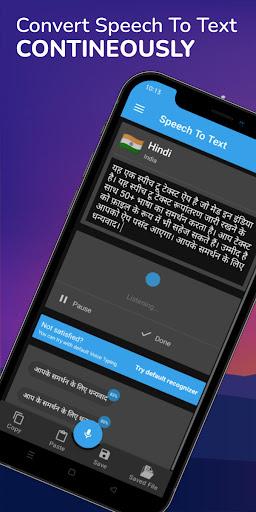
Tap the microphone and start speaking. The app converts speech to text in real time. Use dictation for notes, reminders, messages, documents, study material, and quick ideas.
🗣️ VOICE TO TEXT & VOICE TYPING
Turn voice to text while you speak. Voice typing helps create work notes, personal notes, drafts, and documents without using the keyboard.
🎙️ VOICE RECORDER, VOICE MEMO & VOICE NOTES
Record spoken content or import a voice recording and convert it into text. Use the voice recorder to text workflow for conversations, reminders, interviews, and personal recordings. Create a voice memo or voice notes and save the result as editable text.
🎧 AUDIO TO TEXT & AUDIO TRANSCRIPTION
Import an audio file and transcribe audio into readable text. The AI audio transcriber supports audio to text conversion for voice recordings, meetings, lectures, interviews, podcasts, presentations.
🎬 VIDEO TO TEXT & VIDEO TRANSCRIPTION
Select a video and convert its spoken audio into text. Video to text is useful for recorded lessons, interviews, meetings, tutorials, podcasts, and presentations. Use video transcription to review speech, create notes, and save a readable transcript.
🤖 AI TRANSCRIBER
The AI transcriber converts live speech, audio, voice recordings, and videos into editable transcripts. Review the text, make corrections when needed, and use it for study, work, research, documentation, or content creation.
⚡ LIVE TRANSCRIPTION
Use live transcription to see text appear while you speak. Capture ideas, conversations, classes, meetings, interviews, and notes in real time.
📝 NOTE TAKER & NOTE TAKING
Use the app as a voice note taker for quick note taking. Create study notes, work notes, meeting notes, lecture notes, research notes, interview notes, and personal notes from speech, audio, or video.
📚 LECTURE TRANSCRIPTION & LECTURE NOTES
Students can use lecture transcription to convert classes, lessons, and study recordings into text. Create lecture notes and review important information without replaying the full recording.
🎙️ PODCAST TRANSCRIPTION
Use podcast transcription to convert podcast audio or video into text. Review episodes, collect notes, find key information, or repurpose spoken content.
🌍 60+ LANGUAGES
Convert speech, voice, audio, and video into text in more than 60 supported languages. Select the spoken language before starting for better results.
📄 EDIT, SAVE, EXPORT & SHARE
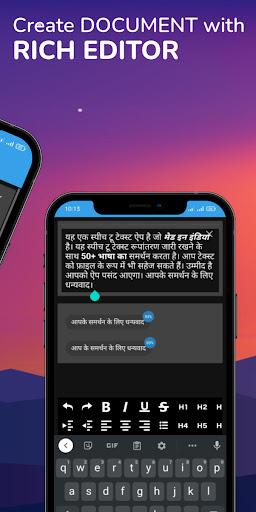
• Edit transcription results
• Copy text instantly
• Save transcripts as TXT
• Export transcripts as PDF
• Share text with other apps
• Access recent transcriptions
KEY FEATURES
• Speech to text and voice to text
• Dictation and voice typing
• Audio to text and video to text
• AI transcriber and AI audio transcriber
• Audio transcription and video transcription
• Live transcription
• Voice recorder to text
• Voice memo and voice notes
• Note taker and note taking
• Meeting transcription and meeting notes
• Lecture transcription and lecture notes
• Podcast transcription
• Interview transcription
• Speech recognition
• 60+ languages
• PDF and TXT export
For Premium Model access an active internet connection is required. Accuracy may vary based on voice clarity, background noise, microphone quality, speaking speed, and audio or video quality. Always review important transcripts before using or sharing them. If you have any queries please mail us at stappsbd@gmail.com

Related Applications



Users Also Installed







Similar Applications